
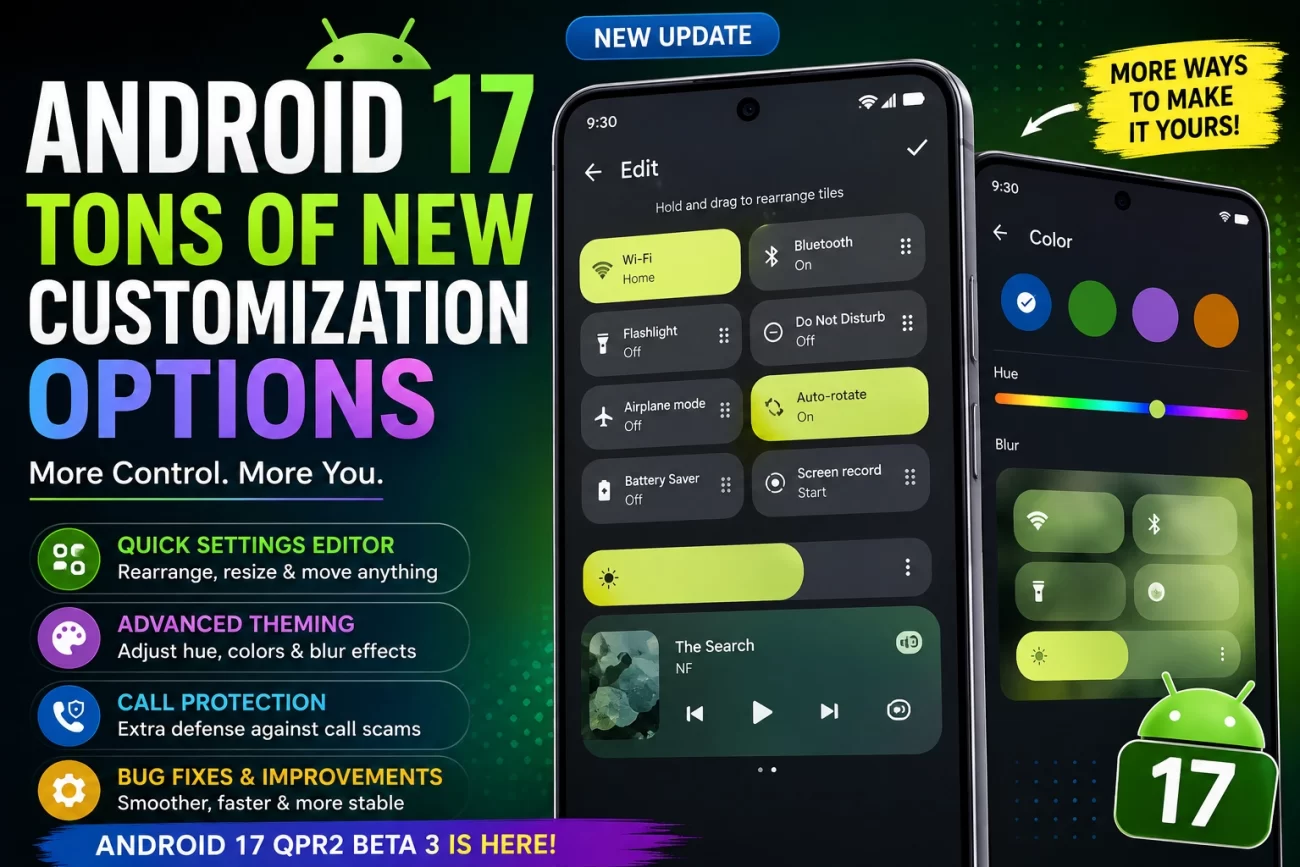
Google is making Android 17 noticeably more personal. The latest Android 17 QPR2 Beta 3 update for eligible Pixel devices introduces several customization-focused changes, with a new Quick Settings editor standing out as one of the biggest additions.
Instead of forcing users to live with Google’s default arrangement, the new controls give Pixel owners much more freedom over how frequently used settings appear on the screen. The update also expands theming options and adds another layer of protection against call-forwarding scams.
Quick take: Android 17 is moving beyond simple wallpaper and color customization. Google is giving users more control over the actual layout and behavior of parts of the interface.
What’s new in Android 17 QPR2 Beta 3?
Here are the biggest changes currently being tested:
- Quick Settings layout editor
- More detailed color customization
- Additional blur effects
- Improved protection against call-forwarding scams
- Bug fixes and stability improvements
Because this is still a beta release, Google could modify or remove some of these features before the final software reaches users.
1. Quick Settings finally becomes much more customizable
One of the most useful additions is the new Quick Settings layout editor.
The Quick Settings panel is something most Android users interact with several times a day. It provides shortcuts for features such as Wi-Fi, Bluetooth, airplane mode, screen recording and other system controls.
With Android 17 QPR2 Beta 3, Google is testing a more flexible approach.
Users can:
- Rearrange Quick Settings controls
- Decide which controls should be larger
- Move frequently used options closer to where they’re easier to reach
- Adjust the position of the brightness slider
- Reposition the media player
- Build a layout that better matches their personal usage
This is a meaningful change because it focuses on how people actually use their phones, rather than simply changing how Android looks.
Recent testing also shows Google continuing to refine the Quick Settings experience across Android 17’s development cycle.
2. Android 17 is expanding color customization
Google isn’t stopping with Quick Settings.
The latest Android 17 testing also brings more control over the system’s visual appearance.
Users can reportedly adjust the hue of the system’s primary colors with a slider, giving them finer control over the overall theme.
That means instead of selecting from a limited number of preset color choices, users can move toward a shade that better matches their wallpaper or personal taste.
Google is also testing additional blur effects, which could give parts of the interface a more layered and polished appearance.
Why this matters
Android has offered extensive customization for years, but Google’s Pixel software has generally taken a more controlled approach.
The new changes suggest Google is gradually giving Pixel users more freedom without requiring third-party launchers or complicated customization tools.
3. Google is also improving protection against call-forwarding scams
Not every change in the beta is about appearance.
Android 17 QPR2 Beta 3 also introduces security measures designed to make call-forwarding scams harder to execute.
Scammers can sometimes trick people into entering special dialing codes that redirect incoming calls to another number. That can become particularly dangerous if someone is expecting calls related to banking or account verification.
The new Android protections target programmatic call-forwarding requests and add additional safeguards around these operations.
Google’s approach is particularly useful because users may not realize that their incoming calls have been redirected until it is too late.
4. Beta 3 also includes bug fixes
Alongside the new features, Google is using QPR2 Beta 3 to address problems found in earlier testing.
Reported fixes include issues involving:
- Quick Settings and notification shade behavior
- Settings app freezes and visual problems
- Connectivity
- Battery-related system reporting
- General system stability
The beta program remains an important testing stage, so additional fixes are likely before the eventual stable release.
Android 17 is becoming more flexible
The bigger story here isn’t just one new Quick Settings feature.
Google appears to be moving Android 17 toward a more flexible Pixel experience where users can personalize how the interface works, rather than simply changing wallpapers, icons or colors.
That’s an important distinction.
A phone used heavily for work might need a completely different Quick Settings arrangement from one primarily used for entertainment. Giving users control over the layout makes the interface more practical instead of merely more attractive.
What could come next?
Google could continue refining these features in upcoming beta releases. Since QPR software is still under development, there’s no guarantee that every experimental customization option will appear exactly as it does today in the final build.
For now, however, Android 17 QPR2 Beta 3 looks like one of the more customization-focused Pixel updates in this development cycle.
Android 17 QPR2 Beta 3: Key changes at a glance
| Feature | What it does |
|---|---|
| Quick Settings editor | Lets users rearrange controls |
| Tile sizing | Provides more flexibility for frequently used controls |
| Brightness slider | Can be repositioned |
| Media player | Can be moved within the layout |
| Color controls | Provides more precise hue adjustment |
| Blur effects | Adds more visual depth to the interface |
| Call-forwarding protection | Helps defend against social-engineering scams |
| Bug fixes | Improves stability and reliability |
Pixel 11 Pro HiLight: How Does the Notification Light Work?
Final verdict
Android 17 is shaping up to be more customizable than previous Pixel software releases.
The new Quick Settings editor could be the feature users notice most because it changes something they interact with every day. Expanded color controls and additional visual effects should appeal to users who enjoy personalizing their phones, while the new call-forwarding safeguards provide a more practical security benefit.
The important thing to remember is that these features are currently part of beta testing. Google can still change the interface, adjust functionality or remove experimental features before the final version is released.
For Pixel owners who like having control over their phone’s interface, though, Android 17 is becoming an update worth watching.
3 thoughts on “Android 17 Adds New Quick Settings Customization Options”